See every bill coming up, and when
Subscriptions renew on different days. Rent, power, and internet follow their own schedules. Some bills change each month. List them once in CatatKoin. You see a calendar of what is due, a reminder before each date, and an expense that adds itself on the day.
Add your first recurring billFree plan. Create an account and add a bill in under a minute.
Small charges are easy to forget
A streaming plan renews on the 23rd. The internet bill comes on the 18th. Car insurance is due once a year. Each one is small, and together they decide how your month goes.
Most of them are repeat charges. CatatKoin calls them recurring expenses. You enter the amount, the schedule, and a category one time. After that, the schedule does the work.
The names, amounts, and dates are illustrative. This is not a customer story.
An example: five bills in October
You pay these bills:
| Bill | Amount | Schedule | Amount type |
|---|---|---|---|
| Home internet | Rp350.000 | Monthly, the 18th | Fixed |
| Laptop installment | Rp1.200.000 | Monthly, the 19th, 12 payments | Fixed |
| Electricity | about Rp450.000 | Monthly, the 21st | Estimated |
| Streaming plan | Rp120.000 | Monthly, the 23rd | Fixed |
| Car insurance | Rp2.400.000 | Yearly, October 30 | Fixed |
From a list in your head to a calendar
- 1
Add each bill
Open Recurring and add a bill. For the internet bill, enter the title, the amount, and a category. Choose the frequency Monthly and the start date.
Choose the Amount Type. Internet is Fixed. Electricity changes each month, so choose Estimated.
- 2
Mark the installment
For the laptop, turn on This is an installment / loan. Enter 12 payments. CatatKoin counts down the payments that remain.
- 3
Decide how each expense arrives
Keep Automatically post to transactions on due date on for bills with a fixed amount. The expense appears on the due date.
For electricity, turn it off. The expense then arrives as a draft. When the real bill comes, open the draft, enter the true amount, and confirm it.
- 4
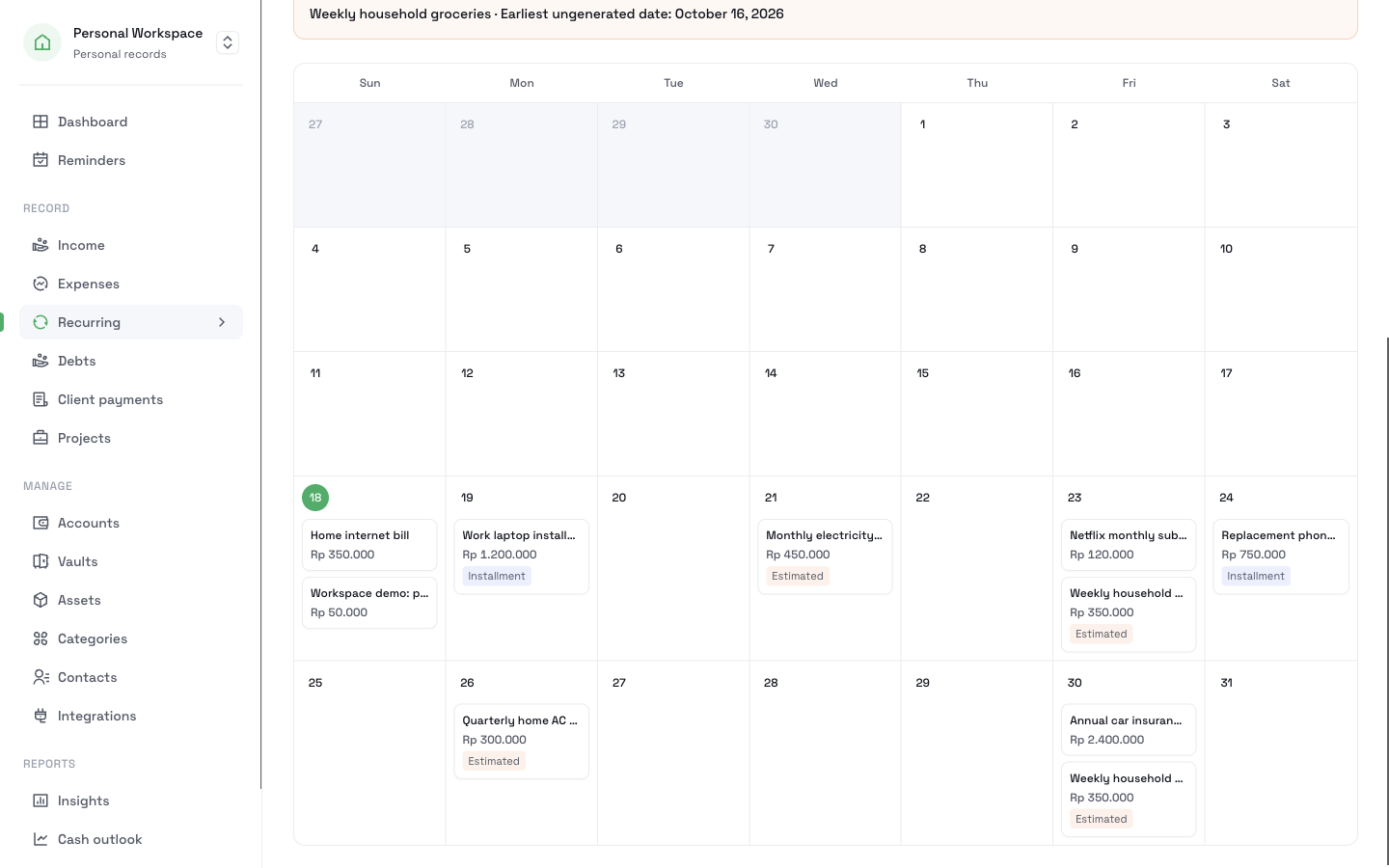
Open the calendar
Open the calendar view for October. Each bill sits on its date. Estimated bills carry an Estimated label, and installments carry an Installment label. The month shows a subtotal for each currency, split into fixed and estimated amounts.
Subtotal for October Amount Fixed Rp4.070.000 Estimated Rp450.000 To see only the installments, filter the calendar for installments. To see only the bills that can change, filter for estimated amounts.
- 5
Get a reminder in time
Set the reminder lead time on each bill. The car insurance is large, so set 14 days. Open Reminders to see what needs attention. If you leave the lead time blank, CatatKoin uses 7 days.
- 6
Log a charge you did not plan
A one-time charge is not a recurring bill. When one shows up, add it as an ordinary expense. From Telegram, send a message such as "parking 25k".
What changed in your records
| Date | What you do | Result |
|---|---|---|
| Once | Add five recurring bills | The calendar lists every due date |
| The 18th | Internet is due | An expense of Rp350.000 appears by itself |
| The 21st | Electricity is due | A draft appears. You confirm the real amount. |
| October 16 | The insurance reminder shows | You have 14 days to prepare |
What you can look back on
One calendar of what is due
Twelve months ahead, filtered by fixed, estimated, or installment.
No surprise on the day
A reminder comes before each date.
Honest estimates
A bill that changes is labeled Estimated until you confirm the real amount.
Your expenses stay complete
Each bill adds its expense, so your totals and Insights include them.
Questions before you start
Related pages
Recurring bills
Track subscriptions, bills, and installments with a calendar up to 12 months ahead. Mark changing amounts as estimates and get reminders before each due date.
Read moreTelegram and API
Send a message like 50k lunch to the CatatKoin bot and it saves the expense. Connect your own tools through the API. No bank login needed.
Read moreAsset register
Keep a private list of what you own, with the purchase cost, serial number, and warranty date. Add your own value estimates and track sold items.
Read moreAdd the bills you pay every month
Start with the three you forget most. Then open the calendar to see the month.
Add your first recurring bill