Know which account runs short, and on which day
Rent is due next week. A client pays at the end of the month, or a few days later. Your money sits in more than one account. CatatKoin shows the cash you expect in each account for the next 7 or 30 days. You see the lowest point and the first day an account goes below zero, before it happens.
See your cash outlookStart from the balances you already recorded. Add the payments you expect. See each day's balance.
Your total balance can hide a problem
When you freelance, your bank balance today does not tell you about next week. Rent leaves one account. A client payment arrives in the same account, but later. You move money to your e-wallet for daily spending.
Your total across all accounts can look fine. One account can still go below zero for a few days. Often, a failed payment is the first sign.
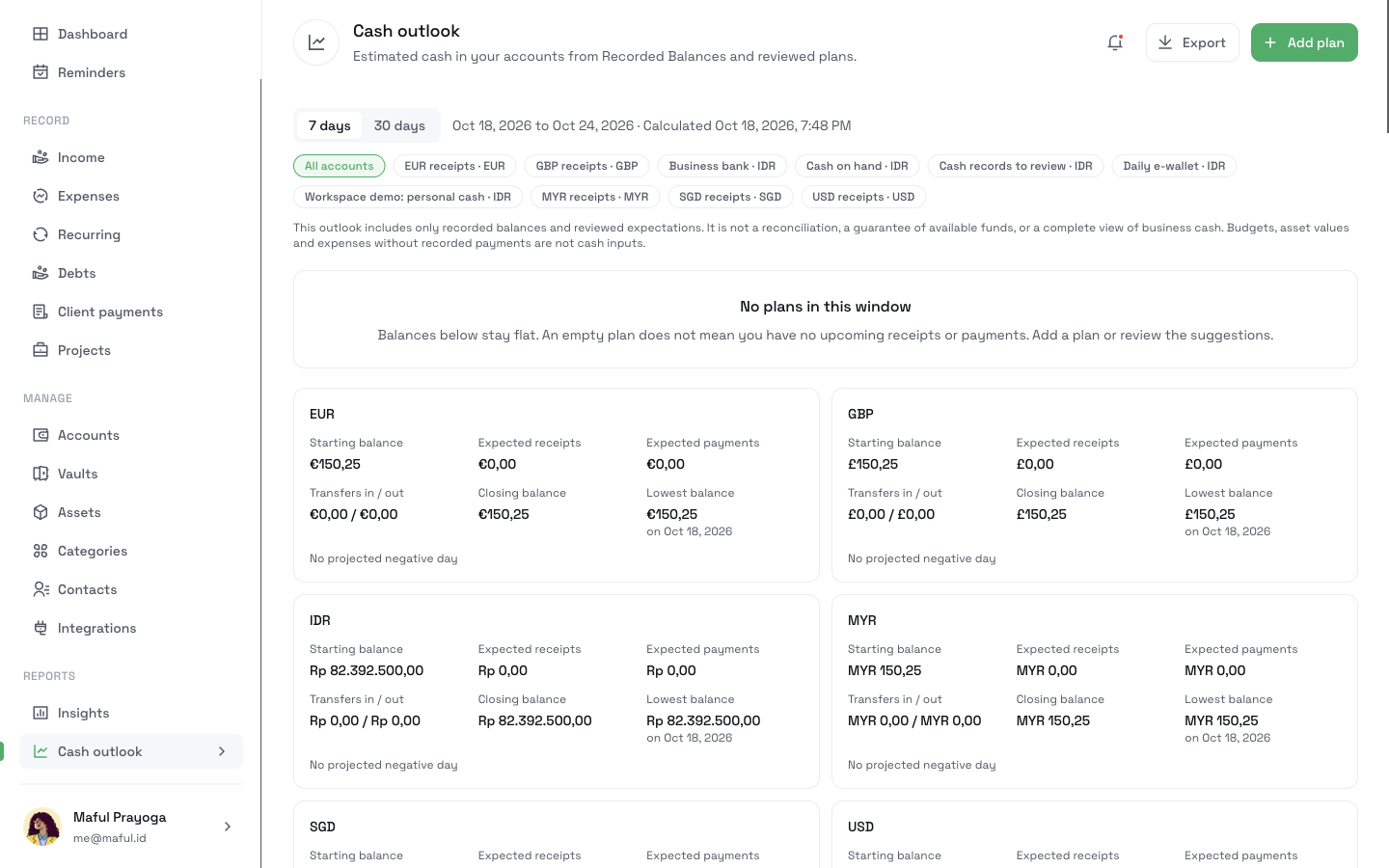
A Cash outlook is an estimate of your money for the coming days. It starts from your Recorded Balances. A Recorded Balance is the balance CatatKoin calculates from the money you recorded in an account. Then the outlook adds only the plans you confirmed. It shows a closing balance for each day, for each account and for each currency.
The names, amounts, and dates are illustrative. This is not a customer story.
A freelance designer checks the next 30 days
You are a freelance designer in Indonesia. It is Tuesday, October 20, 2026. You have two money accounts in IDR:
| Money account | What you use it for | Recorded Balance today |
|---|---|---|
| Work bank | Client payments and work bills | Rp4.000.000 |
| Daily wallet | Everyday spending | Rp500.000 |
These payments are coming:
- Office rent of Rp3.500.000 is a monthly recurring cost. It is due on October 25.
- Design software costs about Rp450.000 each month. The amount changes a little each month.
- Studio Merah owes you Rp6.000.000 for a website redesign. The deadline is October 31. Studio Merah usually pays a few days late.
- You borrowed Rp1.500.000 from your friend Andi. You agreed to repay it on November 10.
- You want to move Rp1.000.000 from Work bank to Daily wallet for spending money.
You already track the rent and the software in Recurring, the client charge in Client payments, and the loan in Debts.
From scattered due dates to one daily view
- 1
Open the outlook
Open Cash outlook in the sidebar, under Reports. The page says: "Estimated cash in your accounts from Recorded Balances and reviewed plans."
At the top, choose 7 days or 30 days. Both include today. Choose 30 days. The outlook covers October 20 to November 18.
The IDR card shows a Starting balance of Rp4.500.000. That is Work bank plus Daily wallet. You have no plans yet, so the page says "No plans in this window". Every day keeps the same balance.
An empty outlook does not mean you owe nothing. It means you did not add any plans yet.
- 2
Turn suggestions into plans
Scroll to Suggestions. CatatKoin lists upcoming amounts from your recurring costs, your client charges, and your dated debts:
Suggestion Type Amount Source date Office rent Expected payment Rp3.500.000 Due Oct 25 Design software (Estimated) Expected payment Rp450.000 Due Oct 27 Website redesign, Studio Merah Expected receipt Rp6.000.000 Due Oct 31 Repay Andi Expected payment Rp1.500.000 Due Nov 10 A suggestion is not part of the outlook. It adds nothing until you confirm it. This way, a deadline does not turn into a payment date by itself.
Click Plan this next to Office rent. The Add plan form opens with the title, amount, and type filled in. The form says: "A plan estimates future cash. It does not record Income, a payment, or a transfer."
Choose Work bank as the Paying account. Keep the Expected date of October 25. Click Save plan.
Do the same for the other suggestions:
Plan Account Expected date Why this date Design software Work bank October 27 The card charge comes 2 days after the due date Website redesign, Studio Merah Work bank November 3 Studio Merah usually pays a few days late Repay Andi Work bank November 10 The agreed date The Expected date is the day you think the money moves. It does not change the deadline on the client charge or on the debt. The October 31 deadline stays on the Studio Merah charge.
The software plan shows an Estimated label, because the recurring cost uses an estimated amount.
- 3
Add your own plan for a transfer
Click Add plan. Choose the type Expected transfer. Fill in the form:
Field Example Title Spending money From account Work bank To account Daily wallet Amount Rp1.000.000 Expected date October 28, 2026 Click Save plan. A planned transfer moves money between your own accounts. Your total does not change. Work bank goes down by Rp1.000.000, and Daily wallet goes up by Rp1.000.000.
You can also add a plan with no source. Examples are a payment you expect from a new client, or a one-time bill. Choose Expected receipt or Expected payment.
- 4
Find the shortfall
The IDR card now shows:
Starting balance Expected receipts Expected payments Transfers in / out Closing balance Lowest balance Rp4.500.000 Rp6.000.000 Rp5.450.000 Rp1.000.000 / Rp1.000.000 Rp5.050.000 Rp550.000 on Oct 27 Your total never goes below zero. But a red box appears above the daily table:
Account shortfalls. Work bank goes below zero on Wed, Oct 28. Lowest −Rp950.000 on Wed, Oct 28.
Here is why. Rent and software leave Work bank first. Then the transfer takes Rp1.000.000 on October 28. Studio Merah pays only on November 3.
Date Work bank Daily wallet Total Oct 20 (start) Rp4.000.000 Rp500.000 Rp4.500.000 Oct 25, rent Rp500.000 Rp500.000 Rp1.000.000 Oct 27, software Rp50.000 Rp500.000 Rp550.000 Oct 28, transfer −Rp950.000 Rp1.500.000 Rp550.000 Nov 3, Studio Merah Rp5.050.000 Rp1.500.000 Rp6.550.000 Nov 10, repay Andi Rp3.550.000 Rp1.500.000 Rp5.050.000 To see one account, choose it under Accounts in this outlook. With only Work bank selected, the transfer shows as one payment out of Work bank.
Fix the plan before it happens. Click Edit on Spending money. Change the expected date to November 4. Click Save plan. The red box disappears. Work bank now has its lowest point on October 27, at Rp50.000.
On a phone, the outlook shows one card per day. On a computer, it shows a table with one row per day. Days without plans also appear, with the text "No planned cash".
- 5
Match money when it arrives
On November 3, Studio Merah pays only Rp4.000.000 into Work bank. Record it the usual way. Open the charge in Client payments, click Record new receipt, and apply it to the Website redesign charge. Work bank goes up once, by Rp4.000.000.
Now tell the outlook. On the Studio Merah plan, click Match money. The dialog says: "Link part of a recorded receipt, payment, or transfer to this plan. Matching does not create or move money."
Choose the Rp4.000.000 receipt. In Amount to match, keep Rp4.000.000. Click Match money.
The plan now shows:
- Planned: Rp6.000.000
- Matched: Rp4.000.000
- Remaining: Rp2.000.000
The outlook counts only the remaining Rp2.000.000. The Rp4.000.000 is already in your Recorded Balance, so the outlook does not count it a second time.
When money moves for your other plans, match it the same way. For the rent, record the Expense Payment for the October rent expense. Then match it on the rent plan.
- 6
Review a plan that is late
On November 4, the remaining Rp2.000.000 did not arrive. The plan leaves the daily table and moves to Needs review. The reason says: "The expected date has passed. Choose a new date to keep this plan."
CatatKoin never moves a late plan to today by itself. A late payment is not a payment you can count on.
You message Studio Merah. They promise the rest by November 12. Click Review, set the expected date to November 12, and click Save plan. The plan comes back to the outlook on November 12.
Needs review also lists suggestions whose date passed, plans whose source changed, and transfers to or from an archived account. Nothing in Needs review counts in your balances.
- 7
Cancel a plan you no longer expect
Andi tells you there is no rush to repay. Click Cancel on Repay Andi. Write a reason, such as "Andi agreed to wait until December". The plan moves to Cancelled plans at the bottom of the page.
Cancel does not change the debt in Debts. It only removes the payment from your outlook. Later, click Reinstate and choose a new expected date.
- 8
Export the outlook
Click Export. The Export cash outlook dialog says: "Download a private CSV file of this outlook. It uses the same accounts and dates as the page."
A CSV is a plain table file that opens in Excel or Google Sheets. Each row has a row type. The types include summary rows, daily balances, plans, review items, and suggestions. Each plan row shows the planned, matched, and remaining amounts.
What changed in your records
Plans do not move money. Only recorded receipts, payments, and transfers change a Recorded Balance.
| Date | What you do | Changes a Recorded Balance? |
|---|---|---|
| October 20 | Plan rent, software, Studio Merah, and Repay Andi | No |
| October 20 | Add the Spending money transfer plan | No |
| October 20 | Move the transfer plan to November 4 | No |
| November 3 | Record the Rp4.000.000 receipt from Studio Merah | Yes, Work bank +Rp4.000.000 |
| November 3 | Match the receipt to the Studio Merah plan | No |
| November 4 | Review the late plan and set November 12 | No |
| November 4 | Cancel Repay Andi | No |
What you can look back on
One view of the coming days
You see each day's closing balance, the lowest point, and the first day below zero.
Warnings for each account
A healthy total does not hide an account that runs short.
Plans you chose
Nothing enters the outlook until you confirm its amount, account, and date.
No double counting
Money you recorded counts once. A match only reduces what you still expect.
Questions before you start
Related pages
Cash outlook
See each account's estimated daily balance for the next 7 or 30 days. Plan expected payments and find the first day an account goes below zero.
Read moreMoney accounts
Record each bank account, e-wallet, and cash wallet with its own balance. Log income and transfers between your accounts without a bank connection.
Read moreRecurring bills
Track subscriptions, bills, and installments with a calendar up to 12 months ahead. Mark changing amounts as estimates and get reminders before each due date.
Read moreDebts and loans
Track money you lent or borrowed, record each repayment, and see what is overdue. Settle the debts that are paid. Needs CatatKoin Pro.
Read moreTrack client payments
Record received client payments in the right account. Review income by date or source, see recorded balances, and correct payment details in CatatKoin.
Read moreSee the next 30 days of your cash
Open Cash outlook and plan the next big payment you expect. Add the next bill. Then see whether any account goes below zero before the money arrives.
See your cash outlook