Know who owes you, and who you owe
Track money you lent or borrowed with friends and family. Each debt has a person, a balance, and an optional due date. Record each repayment as it happens, and see what is overdue.
Track your first debtDebts and loans need CatatKoin Pro. Create an account to start.
What it does
Lent or borrowed
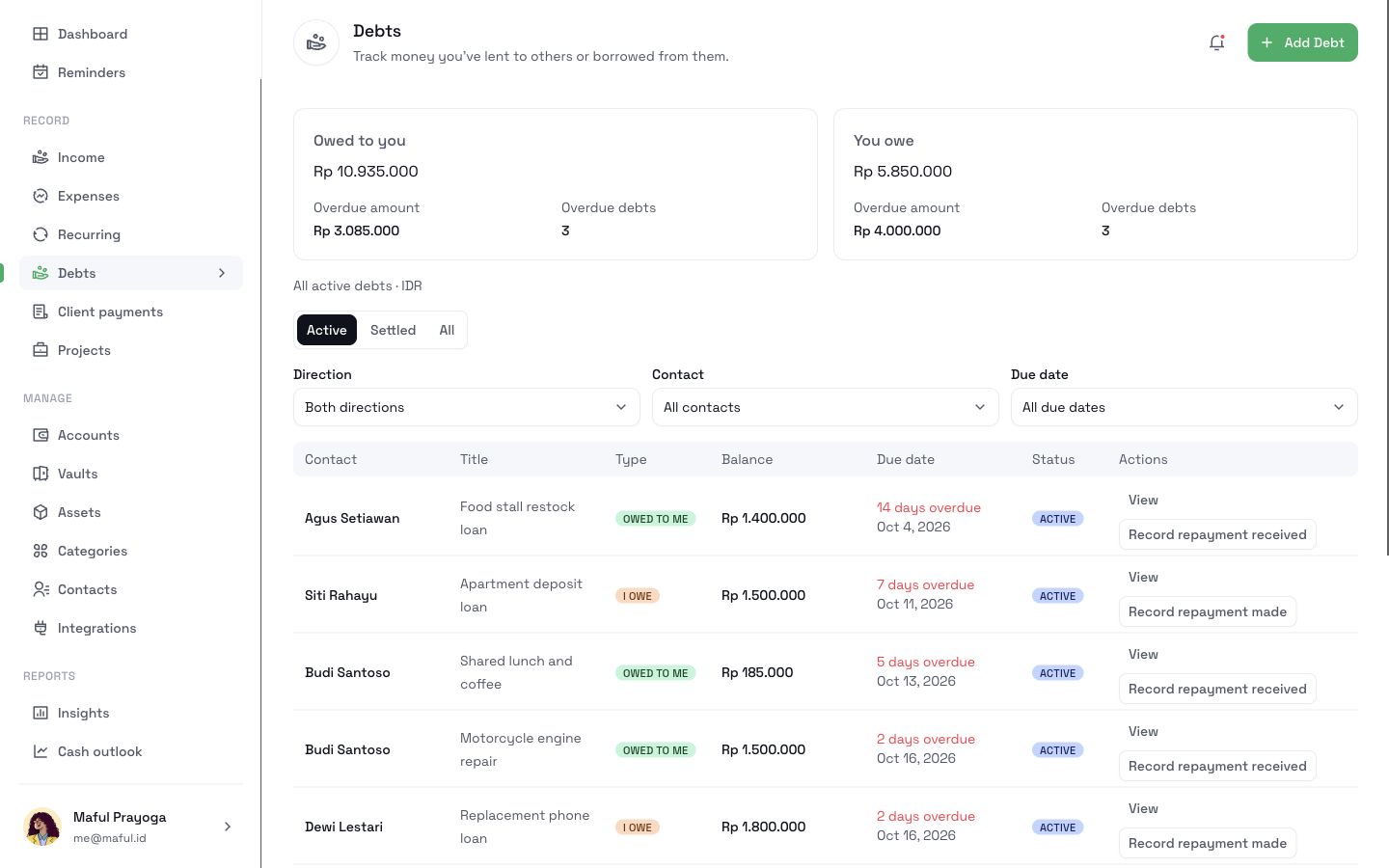
Add a debt with a contact and a direction. The list marks each one as Owed to me or I owe.
A balance that follows the repayments
Start with the amount. Add repayments, extra loans, or adjustments later. The balance updates each time.
An overview that puts overdue debts first
See the total owed to you and the total you owe. See the overdue amount and the number of overdue debts. Filter by active or settled, direction, contact, or due date.
Settle a debt
CatatKoin settles a debt at a zero balance. To close one early, settle it by hand. CatatKoin then records the rest as forgiven.
Deadlines that reach you
A debt with a due date shows in Reminders from 7 days before it is due. A planned repayment can also show in your Cash outlook.
How it works
- 1
Open Debts and click Add Debt.
- 2
Choose the contact and the direction, lent or borrowed. Enter an optional title, the initial amount, and an optional due date.
- 3
When a repayment arrives, click Record repayment received. When you pay, click Record repayment made.
- 4
Open a debt to see its balance and its history.
- 5
At a zero balance, the debt settles. To close a debt early, settle it and forgive the remaining balance.
What it does not do
- It does not move money. A repayment here does not change an account balance or create Income.
- It does not keep client charges. Use Client payments for what a client owes you for work.
- It does not collect or send payments.
- It does not convert currencies. A reminder needs an IDR balance.
Related pages
Lend and borrow with friends and family
Write down who borrowed what, the due date, and each repayment. See what is overdue and settle the loans that are paid. Needs CatatKoin Pro.
Read moreCash outlook
See each account's estimated daily balance for the next 7 or 30 days. Plan expected payments and find the first day an account goes below zero.
Read moreStop keeping loans in your head
Write down who borrowed what, and the due date. Then each repayment brings the balance down.
Track your first debt