Log an expense by sending a message
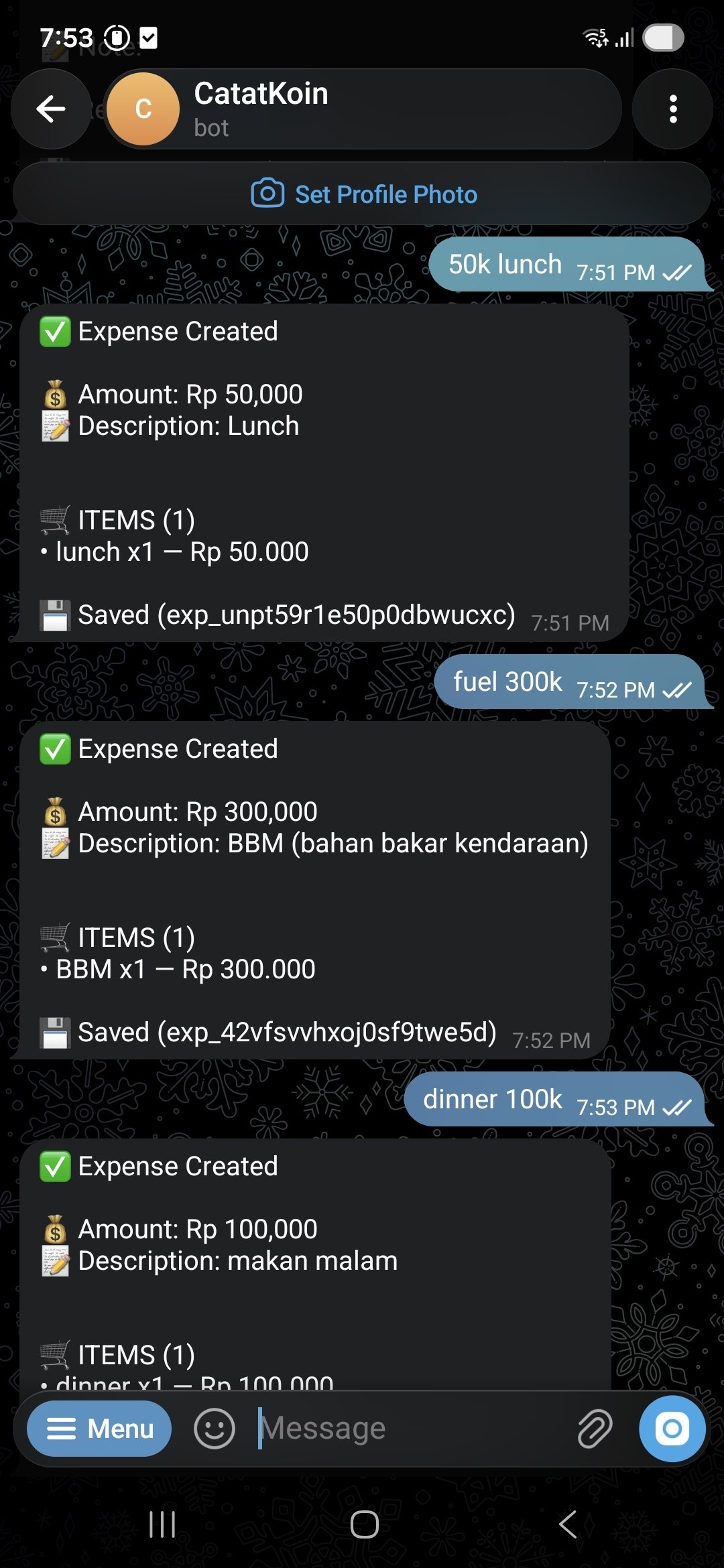
Send a message such as “50k lunch” to the CatatKoin bot on Telegram. The bot saves the expense and replies with the amount and the description. You can also create expenses from your own tools through the API.
Connect Telegram for freeFree plan. Create an account, then connect the bot in a few steps.
What it does
Short messages become expenses
Write the thing and the amount, for example “fuel 300k”. The bot saves an expense and shows what it saved.
One connection
Connect once from the Integrations page. After that, every message goes to your list.
A category picked for you
CatatKoin reads the description of an API expense and picks one of your existing categories. Open the expense to keep that category or change it. If CatatKoin is not sure, it uses Miscellaneous.
An API for your own tools
Create and list expenses with a token. Your scripts and apps then add to the same list as the web app.
How it works
- 1
Open Integrations in CatatKoin and add Telegram. Copy your API token.
- 2
In Telegram, search for the CatatKoin bot, @CatatKoinBot.
- 3
Send the
/connectcommand. When the bot asks, paste your API token. - 4
Send a message, for example “50k lunch”. The bot replies that the expense was created.
- 5
Open Expenses in CatatKoin to see it. If a category was picked for you, keep it or change it.
What it does not do
- It does not read your bank or import transactions. You send each expense.
- It logs expenses only. Income, vaults, and debts need the web app.
- It works with Telegram. No other chat app is available now.
- It does not pick a category you did not create. It chooses from the categories you already have.
Related pages
Keep track of subscriptions and bills
List your subscriptions, bills, and installments once. See a calendar of what is due, mark changing amounts as estimates, and get reminders in CatatKoin.
Read moreExpense tracking
Log expenses in seconds from the web, Telegram, or the API. Sort them into categories and vaults, review drafts, and export a CSV. No bank login needed.
Read moreLog it while you still remember it
Connect the bot, and the next lunch takes one message.
Connect Telegram for free